Template
Inventory tracker app for your team
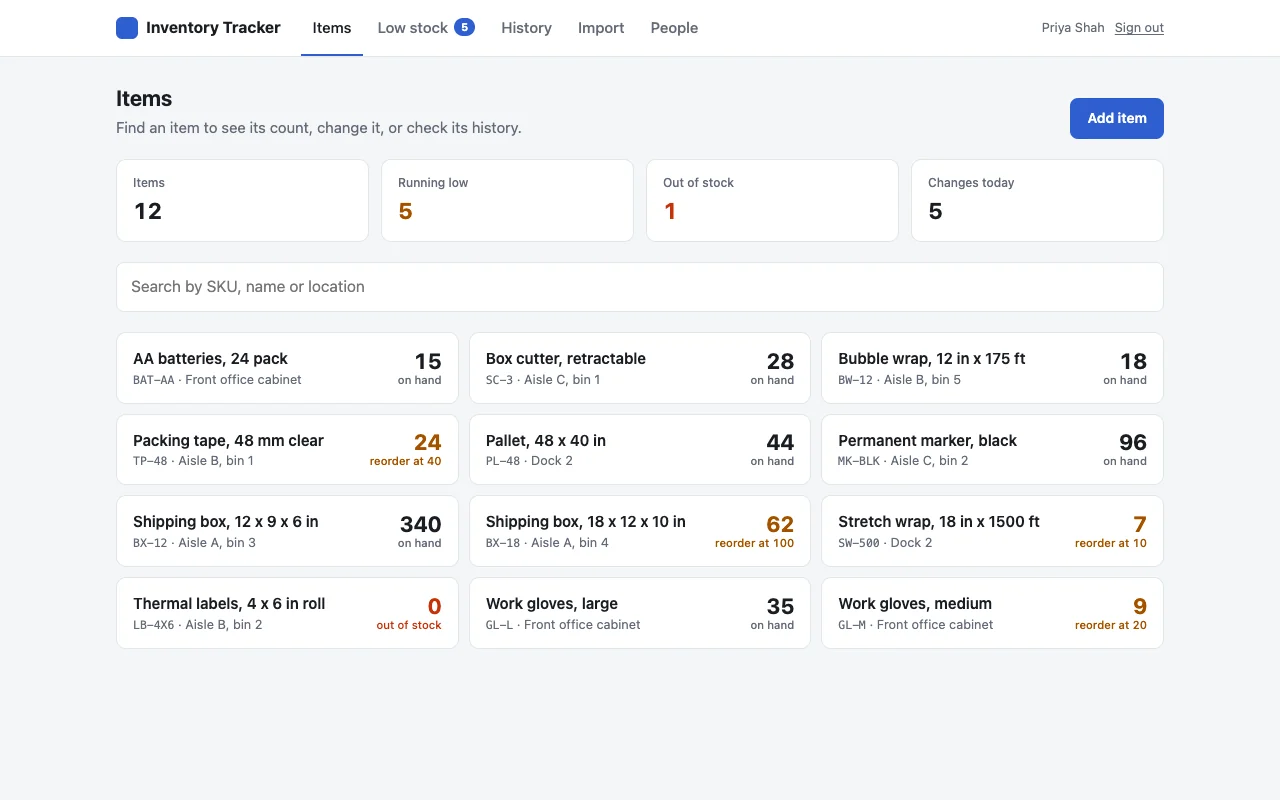
An inventory tracker app for the stockroom, warehouse or front office. Anyone on the team can update a count from their phone, and you always know what is running low. Only your coworkers can open it.
Made for: Warehouse, stockroom, kitchen, front office
01What it does
What your team gets
Every item in one place
Each item has a SKU or code, a location such as a bin, shelf or room, a count and a reorder level. Search by any of them.
Update counts from a phone
Log what came in, what went out, what was damaged, or a fresh count. Counts can’t go below zero, even when two people save at once.
A history of every change
Who changed what, when and why, for every item.
Know what is running low
A low stock list, emptiest first, and a badge with how many items are low.
Bring your spreadsheet
Admins paste rows straight from Excel or Google Sheets to add or update items in bulk.
02Roles
Who can do what
Only people who can open the app get this far. Inside it, the owner gives roles to coworkers by work email on the People page.
| Who | Can |
|---|---|
| Everyone who can open the app | Look up items, add items, change counts, edit details, see the history |
| Admins | Import from a spreadsheet, delete items, change who is an admin |
| The owner (who first deploys it) | Everything |
Who can open the app at all is set by TeamOnly: everyone at your company, or only the people you name with npx teamonly access only.
03Start
Online in a few commands
You need Node.js on your computer, which Claude Code and Cursor users already have. Run these in a terminal.
Make the app
This creates a new folder called
stockwith the whole app and installs what it needs.Try it on your computer
It opens at
http://localhost:5173, signed in as a test user who owns the app.Put it online
Sign in once per computer, then deploy. You get a link like
stock.acme.teamonly.appthat only your company can open.
npx teamonly init --template inventory-tracker stockCreated "stock" from the inventory-tracker templatecd stock && npm installnpm run devLocal: http://localhost:5173/npx teamonly loginSigned in as dana@acme.comnpx teamonly deployLive at https://stock.acme.teamonly.appOnly @acme.com accounts can sign in.04Make it yours
Change it by asking your AI
The template is ordinary code in your folder. Ask Claude Code or Cursor for changes in plain words, check them with npm run dev, then deploy again. Some ideas:
Let people scan a barcode with their phone camera to find the item instead of searching.
Add a supplier and unit cost to each item, and show the value of what is in stock.
Add a Download CSV button to the low stock page so I can send it to purchasing.
Email the purchasing team the low stock list every Monday morning.
05Cost
What it costs
- The template is free. You pay for TeamOnly, which hosts it, after a 14-day free trial with no card.
- Builder, $19 a month: one builder and up to three apps.
- Team, $249 a month: any number of builders and apps, and anyone with your company email can deploy.
- Coworkers who only use the app are free. No seats to buy.
Read the code first
Every template is open on GitHub, with its README. Look at it before you start, or show it to IT.
Can people use the inventory tracker on their phones?
Yes. It works in the phone’s browser. People sign in once with their work account and can look up an item and change its count from the stockroom floor.
How do I get my current stock in?
Copy the rows from Excel or Google Sheets, with the heading row, and paste them on the Import page. Items are added or updated by their SKU.
What happens if two people change the same count at once?
Both changes are kept, one after the other, and the count can’t go below zero. Each one shows in the history with who made it.
Can it scan barcodes?
Not out of the box. Ask your AI tool to add a barcode scanner that uses the phone’s camera; it is one of the changes the template is set up for.
Can it email me when stock is low?
Not out of the box, but it is an easy change. TeamOnly apps can email coworkers and run jobs on a schedule, so ask your AI tool to email you the low stock list every morning. The list and the badge in the app also show what needs ordering.
Early access
Put your first tool online this week.
TeamOnly is in early access, and every plan is open now. Try it free for 14 days with no card, or subscribe. Either way, your company is ready right away, and three commands put your first app online.
Not ready? Get updates
Questions go to hello@teamonly.dev, and a person answers.