Template
Expense approval app for your team
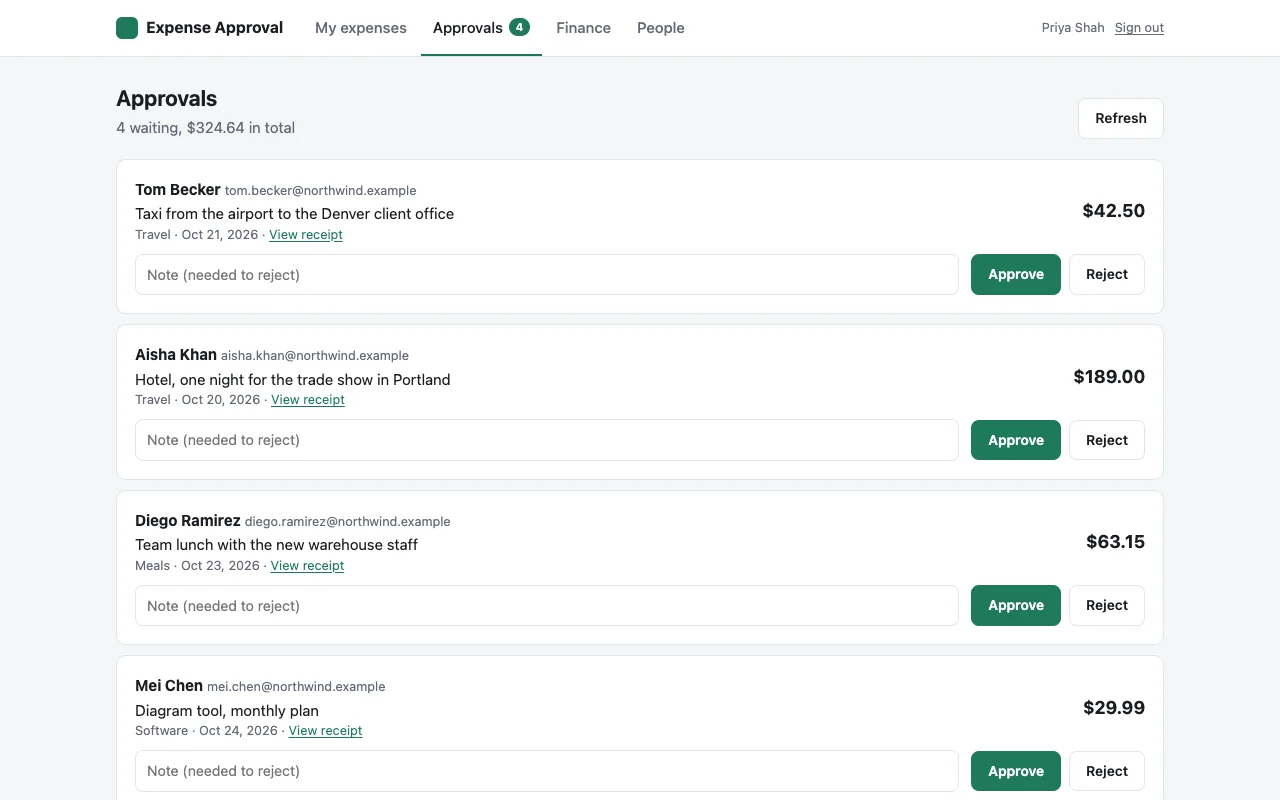
An expense approval app you can have online today. People send a receipt, a manager approves it, and finance gets the month as a spreadsheet. Only your coworkers can open it.
Made for: Finance, managers, and anyone who buys things for work
01What it does
What your team gets
Send an expense in a minute
Amount, date, category and what it was for, with a photo or PDF of the receipt. Works from a phone.
Approve or reject with a note
Approvers see everything waiting and open any receipt. A rejection needs a note, so the person knows what to fix. Nobody can approve their own expense.
People see where theirs stands
Everyone sees their own expenses as waiting, approved or rejected, and can withdraw one that is still waiting.
Finance gets the month
Everything approved in a month, with totals by category, and a CSV download for the books.
02Roles
Who can do what
Only people who can open the app get this far. Inside it, the owner gives roles to coworkers by work email on the People page.
| Who | Can |
|---|---|
| Everyone who can open the app | Send expenses, see their own, withdraw one that is still waiting |
| Approvers | See and decide on everyone’s expenses, open any receipt |
| Finance | See approved expenses by month, download the CSV, open any receipt |
| Admins | Change who is an approver, finance or admin |
| The owner (who first deploys it) | Everything |
Who can open the app at all is set by TeamOnly: everyone at your company, or only the people you name with npx teamonly access only.
03Start
Online in a few commands
You need Node.js on your computer, which Claude Code and Cursor users already have. Run these in a terminal.
Make the app
This creates a new folder called
expenseswith the whole app and installs what it needs.Try it on your computer
It opens at
http://localhost:5173, signed in as a test user who owns the app.Put it online
Sign in once per computer, then deploy. You get a link like
expenses.acme.teamonly.appthat only your company can open.
npx teamonly init --template expense-approval expensesCreated "expenses" from the expense-approval templatecd expenses && npm installnpm run devLocal: http://localhost:5173/npx teamonly loginSigned in as dana@acme.comnpx teamonly deployLive at https://expenses.acme.teamonly.appOnly @acme.com accounts can sign in.04Make it yours
Change it by asking your AI
The template is ordinary code in your folder. Ask Claude Code or Cursor for changes in plain words, check them with npm run dev, then deploy again. Some ideas:
Add a monthly limit per person and flag anything over it in red for finance.
Let people add a project code to each expense and add it to the CSV.
Change the currency to euros and add a Mileage category.
Email the approvers when a new expense comes in, and send a reminder every morning about anything still waiting.
05Cost
What it costs
- The template is free. You pay for TeamOnly, which hosts it, after a 14-day free trial with no card.
- Builder, $19 a month: one builder and up to three apps.
- Team, $249 a month: any number of builders and apps, and anyone with your company email can deploy.
- Coworkers who only use the app are free. No seats to buy.
Read the code first
Every template is open on GitHub, with its README. Look at it before you start, or show it to IT.
Who can open the expense app?
Only people at your company, signed in with their work Google or Microsoft account or a code sent to their work email. You can narrow it to named people with npx teamonly access only.
Can someone approve their own expense?
No. The app checks this on every decision. If you are the only approver, someone else has to approve yours.
Where are receipts kept?
In the app’s own file storage on TeamOnly, which no other app can read. Receipts can be a photo (JPG, PNG, HEIC, WebP) or a PDF, up to 10 MB.
Can I change the categories or the currency?
Yes. Both are listed in one file, src/shared/types.ts. Ask your AI tool to change them, then deploy again. The default is US dollars with travel, meals, supplies, software, training and other.
Does it send email when an expense is waiting?
Not out of the box, but it is an easy change. TeamOnly apps can email coworkers, so ask your AI tool to email approvers when an expense comes in. Until then, approvers see a count of waiting expenses in the app.
Early access
Put your first tool online this week.
TeamOnly is in early access, and every plan is open now. Try it free for 14 days with no card, or subscribe. Either way, your company is ready right away, and three commands put your first app online.
Not ready? Get updates
Questions go to hello@teamonly.dev, and a person answers.